 Spreadsheet
Home / Fees and exchange rate
Oopbuy fees, dollar shelf prices, and how yuan becomes your currency
What Oopbuy charges in its own words, why a shelf card and a catalogue find show prices in different currencies, how topping up costs money, and which extras are optional.
Read on oopbuy.com: November 10, 2026
Oopbuy's own breakdown of the bill
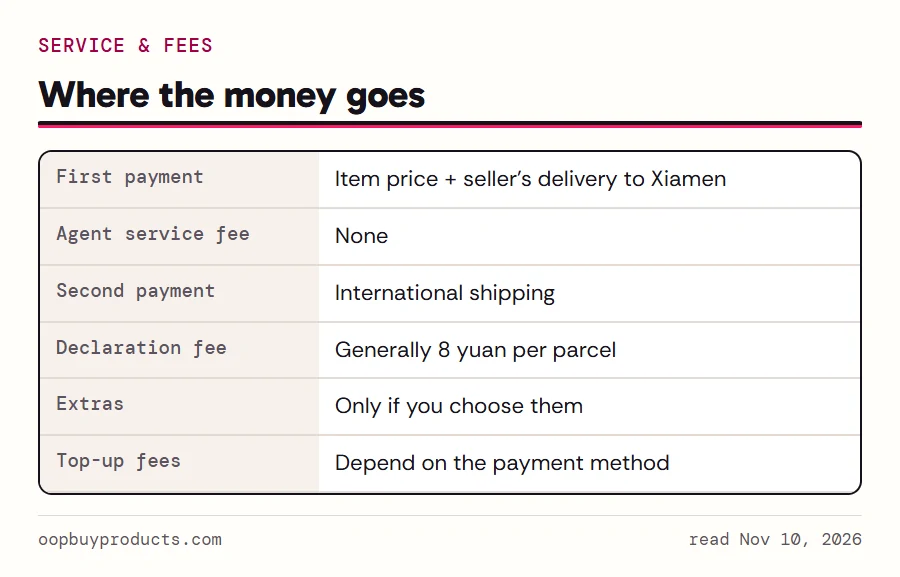
Oopbuy's Service & Fees page adds the bill up from three parts: what the product costs, what international shipping costs, and a customs declaration charge. Product cost means the item price and the seller's delivery to the warehouse. Oopbuy puts the declaration charge at ¥8 for most parcels, with the shipping method able to change it. The same page states that nothing else is charged beyond those and whatever optional services you pick.
So no agent service fee is added to the item. That is a fact about agent orders. For house-shelf items the card price is what you pay for the product; shipping from Xiamen and the declaration fee still come later, with the parcel.
A practical way to read the sum: your first payment is the product cost; your second is shipping plus the declaration fee plus any extras. Nothing in between is automatic.
Shelf prices in dollars, catalogue prices in yuan
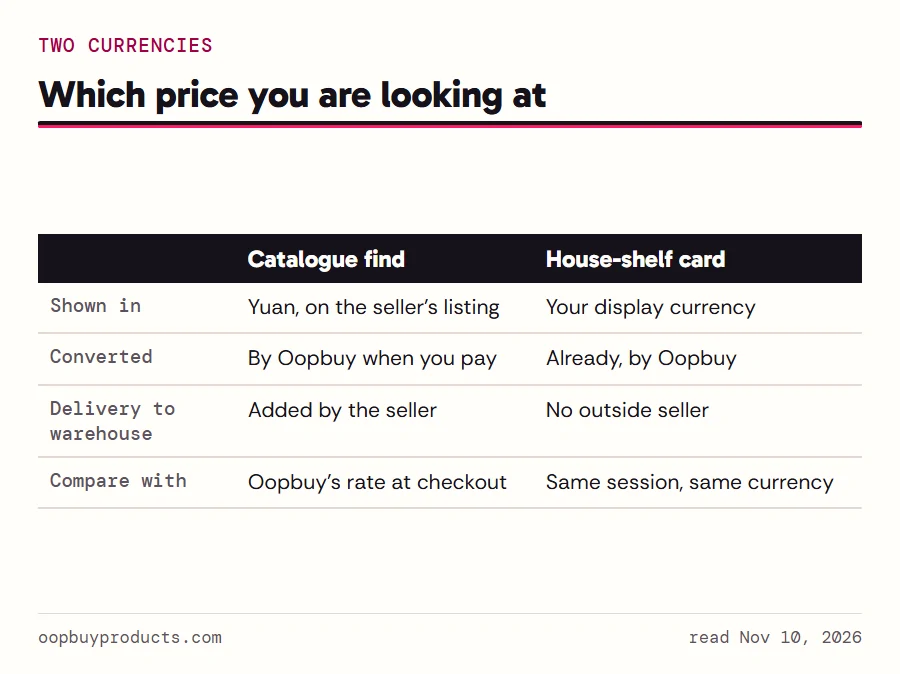
The two kinds of product on this site show money in two ways. A catalogue find leads to a seller's listing priced in Chinese yuan, and Oopbuy converts that when you pay. A house-shelf card on oopbuy.com is already converted: Oopbuy's header lets you pick one of nineteen display currencies, and our readings in US dollars showed Brand Sale, Flash Sale and Mall cards in dollars, while AiKuCun printed USD in front of each figure.
That makes side-by-side comparisons slippery. A dollar figure on a shelf card has already been through Oopbuy's conversion; a yuan figure on a seller listing has not. Compare like with like: convert the yuan price with the rate Oopbuy shows you at checkout, not with a rate from a currency website, and remember that the shelf card does not include the seller's delivery to the warehouse because there is no outside seller.
Prices quoted on this site are the operator's display values on the date given, read in a dollar session. They are examples, not quotes.
A fixed divisor in the shipping estimator
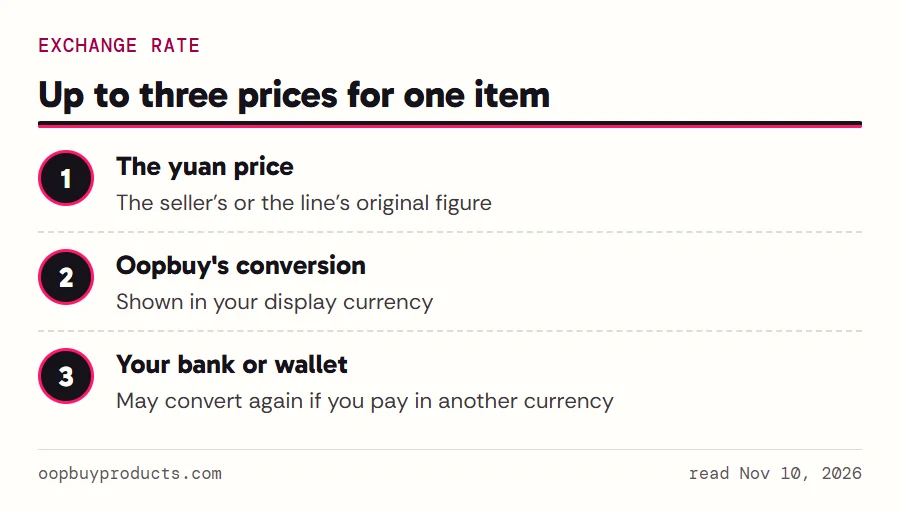
Oopbuy's public shipping estimator prints each shipping line in yuan and in your display currency. The conversion is a fixed divisor applied to every line in the same response, not a live market rate; on November 9 a dollar session divided by about 5.96. That is the one line this site spends on the divisor itself. What matters for you is the habit it suggests: whenever Oopbuy shows two currencies, the yuan figure is the original and the other one is Oopbuy's conversion.
For the product side, the same applies when a seller's yuan price becomes a figure in your currency at checkout. If you pay in a currency other than US dollars, your bank or wallet may convert again on its own terms, which is the second place a rate can move against you.
Topping up and payment fees
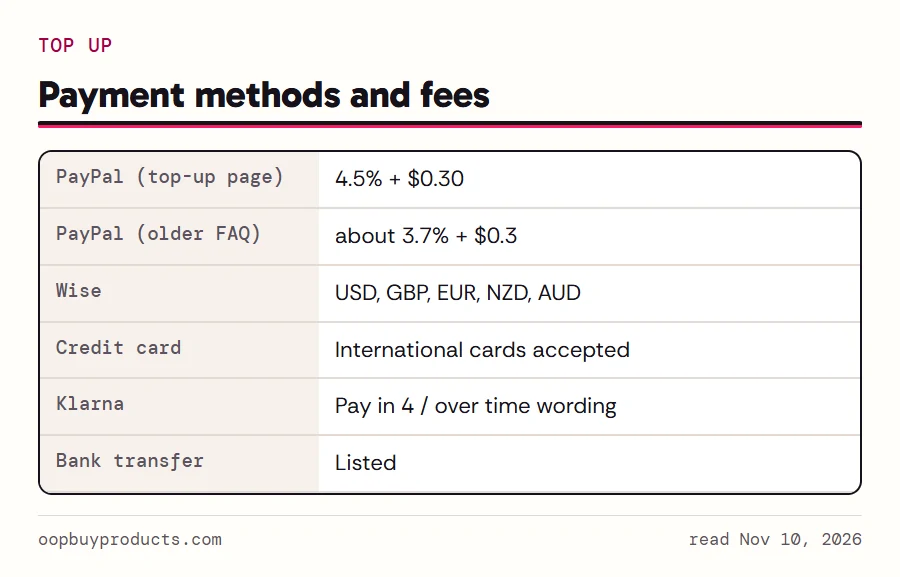
Oopbuy works with an account balance that you top up. The payment page lists PayPal (cards such as Visa, Mastercard, American Express and JCB through PayPal, converted to US dollars), Wise (US dollars, pounds, euros, New Zealand dollars and Australian dollars), international credit cards, Klarna and bank transfer.
PayPal costs money, and Oopbuy states the cost in two places with two different figures. The top-up page gives 4.5% plus $0.30. An older FAQ answer gives roughly 3.7% plus $0.3 instead. Neither is withdrawn, so expect the higher one and be pleased if you see less. Cross-border card payments may also carry a percentage the help centre does not specify.
For a small first order, the PayPal fixed fee is the part that bites: thirty cents on a two-dollar shelf item is a big share. Topping up once for several items spreads it.
Extras you choose to pay for
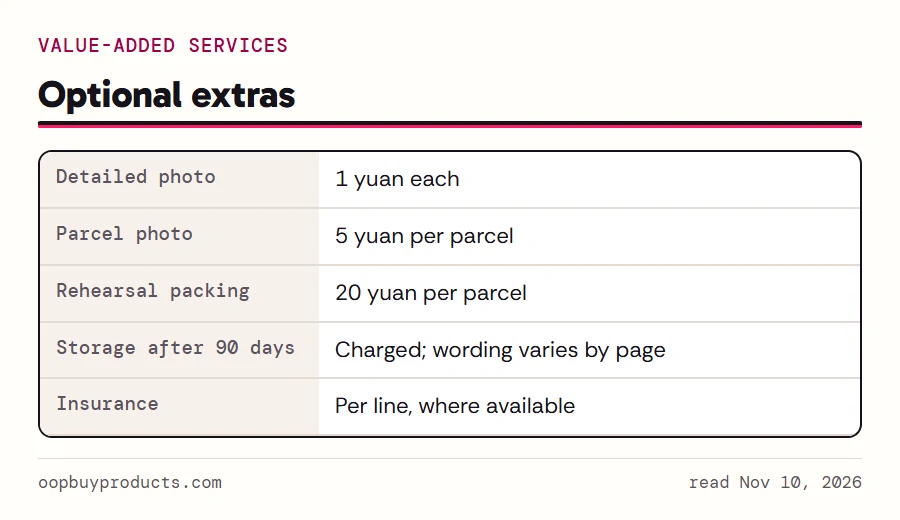
Everything beyond the basic sum is optional, and Oopbuy prices the common extras in yuan. Extra detailed photos cost ¥1 each on top of the free standard ones. A parcel photo is ¥5 per parcel. Rehearsal packing, where the warehouse packs and weighs a parcel before you pay for shipping, is ¥20 per parcel. Storage past the free ninety days is charged too; Oopbuy's own pages describe the extension in more than one way, so check the Storage page for the current wording.
Insurance is set per shipping line: the estimator marks lines with Insurance Available, and compensation follows each line's standard. None of these extras is needed to complete an order. The ones most worth their price for a first order are a couple of detailed photos of anything with a size or a seam that matters.