 Spreadsheet
Home / Buying with Oopbuy
Buying with Oopbuy: a catalogue find, a house-shelf item, and the steps between
Two ways into the same Oopbuy account, what changes between them, Oopbuy's own process video in full, and what signing up gives you.
Read on oopbuy.com: November 10, 2026
Official shopping walkthrough
Follow the Oopbuy process from account setup and ordering to warehouse checks and parcel submission.
Open the original videoOne account, two ways in
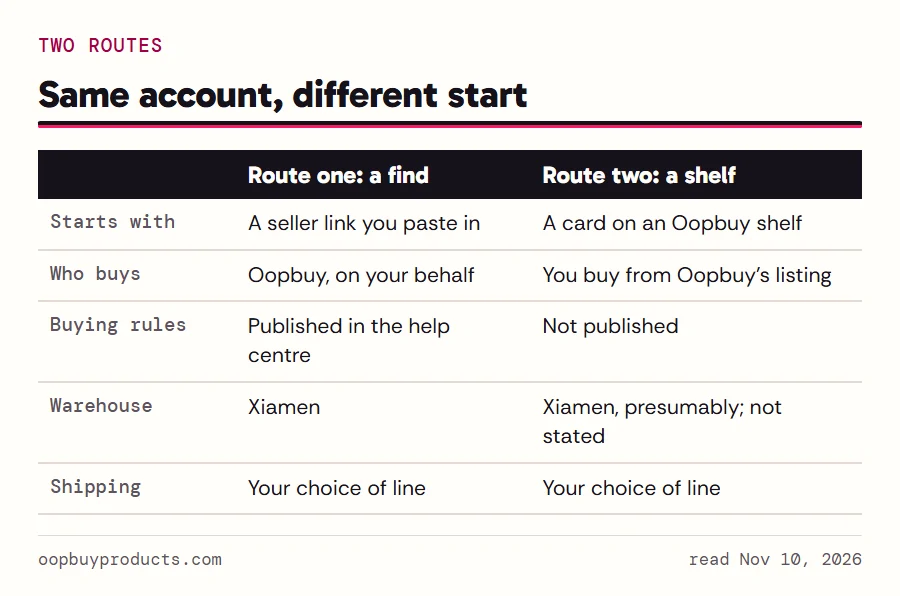
Everything you buy through Oopbuy ends up in the same place: your account, then the warehouse in Xiamen, then a parcel. What differs is the way in. Route one starts outside Oopbuy, with a Taobao, Weidian or 1688 shop page you spotted in a catalogue like this one. You hand Oopbuy the link and it buys on your behalf. Route two starts on Oopbuy's own shelves: Brand Sale, Flash Sale, Mall Recommend, AiKuCun. You buy the product from what Oopbuy lists.
Route one comes with a full set of published rules. Route two shares the shipping side of those rules but not the buying side, because the help centre is written for agent orders. The rest of this page takes the routes one at a time and then follows both through the warehouse.
Route one: a find from the catalogue
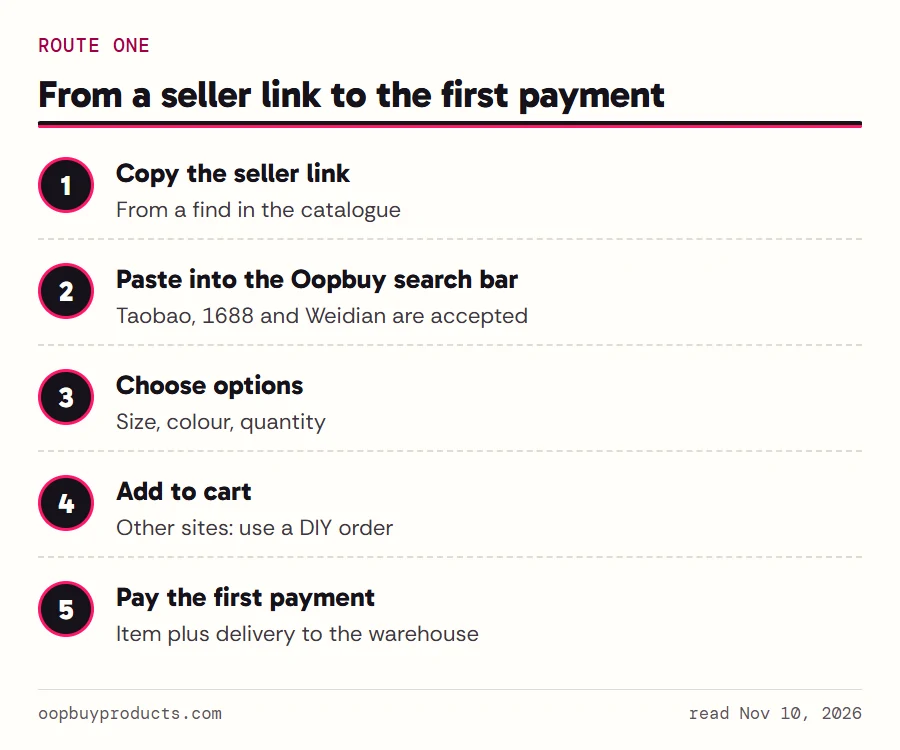
Open a catalogue aisle, pick a find and copy its seller link. Paste the link into the Oopbuy search bar; the small icons inside the bar show the three sources it accepts, Taobao, 1688 and Weidian. Oopbuy loads the listing in its own layout. Choose the size and colour, check the quantity, and add it to the cart.
At checkout you pay for the item and the seller's delivery to the warehouse. Oopbuy's homepage marks this clearly: the first step of its How to Buy panel is labelled This is your first payment 1/2. Links from other Chinese sites can still be ordered through what Oopbuy calls DIY orders, where you fill in the product details by hand.
One related service gets a single line here: transfer orders, where you buy somewhere else yourself and have the seller post to Oopbuy's warehouse. Oopbuy's tutorial covers the steps for that.
Before you paste anything, check the seller and the listing. Once you pay, the five-day return window after the item is stocked in is the main safety net, and it only covers sellers who offer guaranteed returns.
Route two: a product off a house shelf
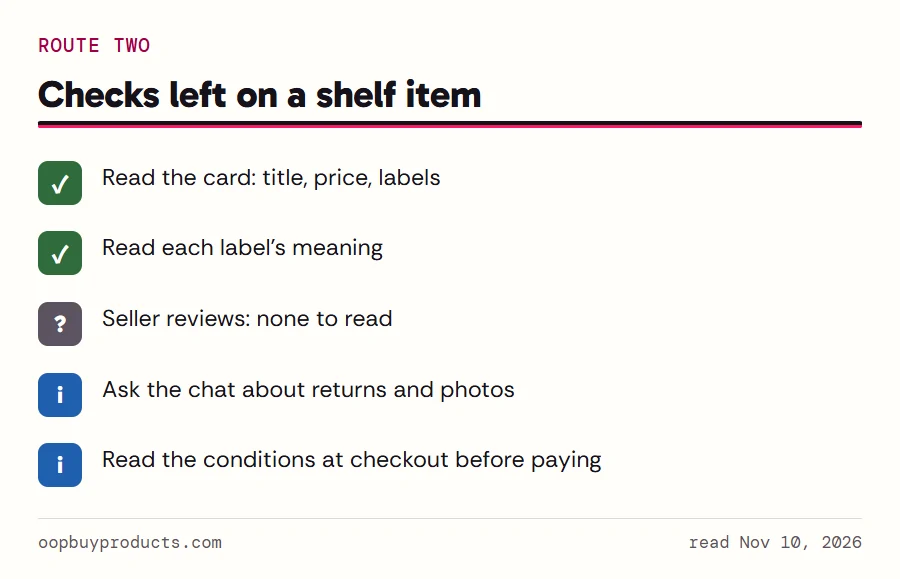
House-shelf cards buy differently. Flash Sale cards have their own Buy Now button. Brand Sale cards carry a small cart icon. Mall and AiKuCun cards lead to Oopbuy's own product pages. In each case there is no outside listing to check and no seller link to paste: the product is whatever Oopbuy's card says it is.
That changes the checks you can do. You cannot read a seller's reviews or compare the original photos. You can read the card, read its labels with the label reader, and ask Oopbuy's chat what happens after payment. Without an account, the product pages did not show their terms to us, so the checkout screen is likely the first place the conditions appear. Read them there before paying.
Prices on these cards are already in your display currency. They include the item; shipping from the warehouse is still separate and comes later, as with route one.
Oopbuy's process video, uncut
The homepage's View process video player runs two minutes and eighteen seconds. It is Oopbuy's own film, its file name dated April 28, 2025, and it is shown here whole. Press play and it loads from Oopbuy's file.
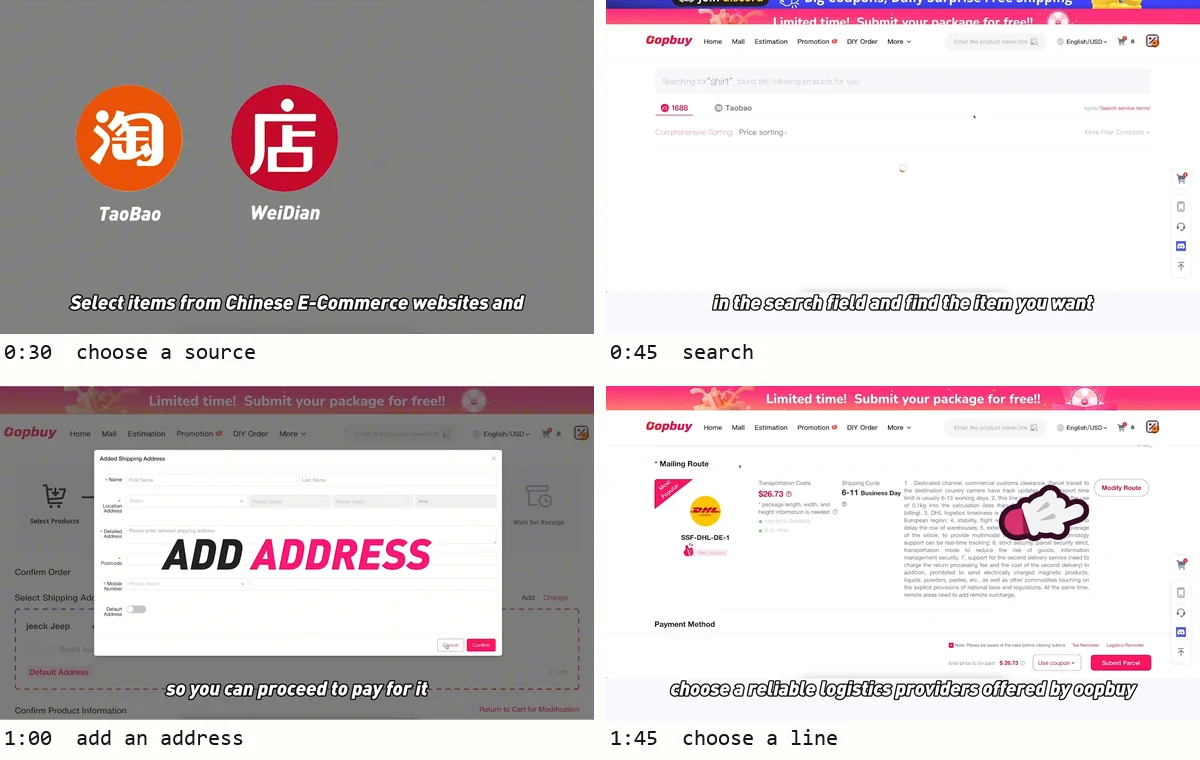
What you will see, in order: the title card; a line about purchasing both online and offline products in China; the Taobao and Weidian icons and the search field where you paste a link; an address form (ADD ADDRESS) so you can pay; a scene of Oopbuy's mascots contacting the sellers and buying the items; a line that Oopbuy offers a dedicated after-sale service; a shipping screen with a DHL line to Germany as the example; the Submit Parcel step with optional purchase protection; and a closing card inviting you to the Discord server.
The interface in the film is older than the live site. The search tabs, the menu and the promotional bar all differ from what oopbuy.com showed on November 10, 2026. Use it for the order of steps, not for button names.
Four frames from the video
These stills, taken at 30, 45, 60 and 105 seconds, show four of the steps it walks through: choosing a source, searching, adding an address, and picking a shipping line. The shipping frame lists a route code, a business-day range and a dollar figure. Those are the film's own example values from when it was made, not current prices.
After payment: warehouse, parcel, delivery
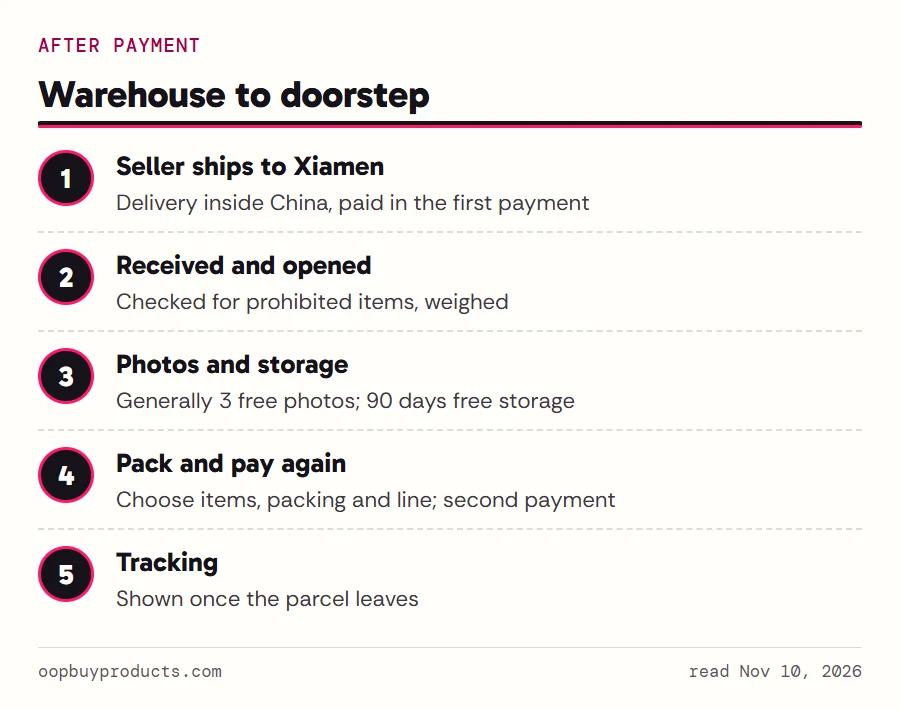
Once the seller ships, the parcel reaches the warehouse in Xiamen. Oopbuy opens every incoming package to check for prohibited items, weighs it and stores it; regular inspection photos, generally three per item, are free. Storage is free for ninety days from the moment the status reads received.
When you want to ship, you pick the stored items, choose packing options and a shipping line, and make the second payment: the international postage plus Oopbuy's per-parcel declaration charge (¥8 in most cases, by Oopbuy's own account). Oopbuy's own step text reads Select your stored items to pack, pay the shipping, and they'll be on their way to you! Tracking appears once the parcel leaves. Read the warehouse page for the inspection and the shipping page for lines and deadlines.
Signing up
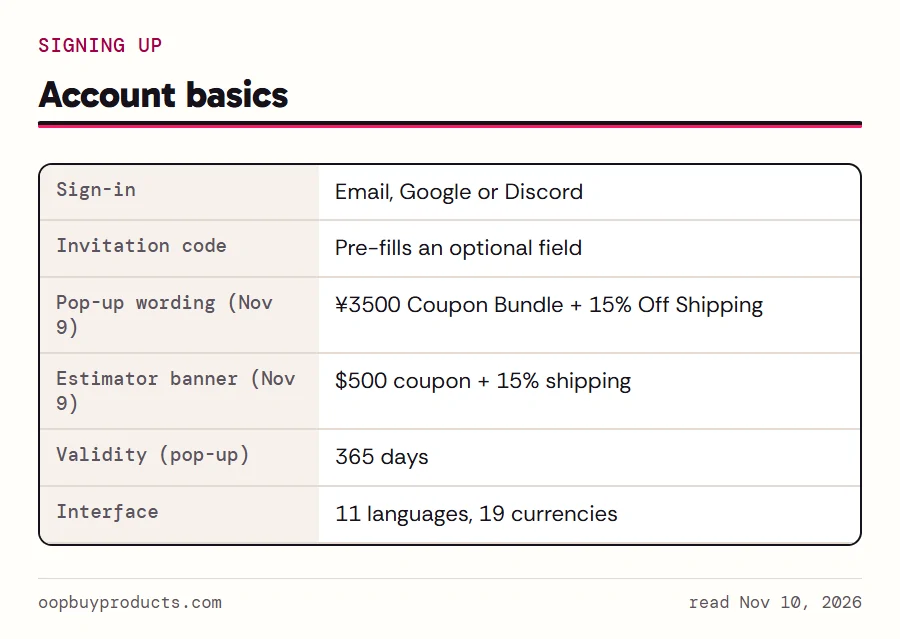
You need an account for anything beyond browsing. Oopbuy offers sign-in with email, Google or Discord. The sign-up link on this site includes an invitation code. It pre-fills the optional invitation field on Oopbuy's form, it is the only way this site earns, and your price stays the same.
New-user offers come in two wordings, and they should not be added together. On November 9 the sign-up pop-up promised a ¥3500 coupon bundle plus a shipping discount, valid for 365 days, while a banner on the shipping estimator page spoke of a $500 coupon plus a shipping discount. The exact wording of both is in the board beside this text. A coupon bundle is a set of separate coupons, each with its own conditions, so read each one in your account rather than treating the headline as a discount.
After signing up, set your currency and language in the header. The interface offers eleven languages and nineteen currencies; the help centre stays in English.